Freeware for Recovering Deleted Data
Wise Data Recovery is a utility application that offers fast and free data recovery services. When you lose files due to accidental deletion, formatted drive, or a system crash, this software can help. It can get back lost files from both internal and external storage spaces. With this, you don’t have to break into a cold sweat whenever you hit the delete button.
Top Recommended Alternative

Quick Scanning
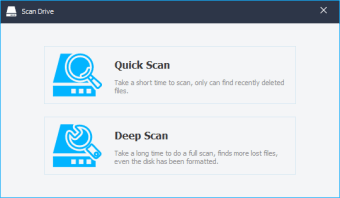
Wise Data Recovery is a lightweight app, so it does not hamper system performance nor interfere with other program’s functionalities. However, it being a small software does not mean it provides a poor job when it comes to recovering lost files. In fact, the app is known for its quick scanning process with little to no errors. With its advanced algorithm, Wise Data Recovery can finish scanning your hard drive in seconds. You won’t have to wait for ages to see the files that it can recover.
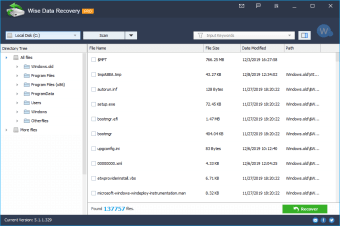
To narrow down searching results and further save time, you can choose your recovery file types and even type in keywords before scanning. You can search for deleted files by their name and extension. Moreover, there is a small arrow next to the search box that lets you choose presets, such as images, documents, emails, videos, and compressed files, which will auto-fill search with common extensions in those categories. Furthermore, the advanced search feature allows users to put in multiple custom file extensions at once, even if the preset option doesn’t include them. With this, you can mix images, documents, and video files in one search.
See What’s Recoverable
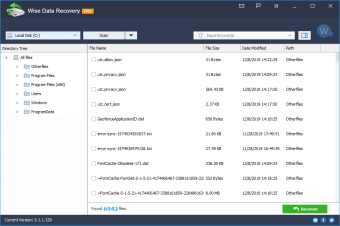
Wise Data Recovery’s capability does not only end with quick file scanning. It also analyzes the possibility of recovering them. At the end of the scanning task, you can view details about the found items, including the file name, size, date when the file was last modified, and its recoverability status. All the files with the green circle next to them have a Good Recoverability status, which means that it hasn’t been overwritten and can be normally restored. Files with orange and red circles are marked as Poor or Lost, respectively. You can still recover these files, but they will likely have no chance of being fully readable.
Fast Recovery
Wise Data Recovery looks good and works very fast in finding important media files and documents in your storage. The same way can be said about its restoring process. Once you've found the files you’re looking for, you can select them to start the recovery. However, when you undelete or restore lost files using the app, the folder structure isn’t retained. You cannot save the recovered files to the drive they came from. You need to create a new directory for them. All restored files will be saved in the newly created directory, which means it will be hard to know where these files came from originally. However, if you are recovering a deleted folder, its subfolders will have the same structure as when they were deleted.
Wise Data Recovery supports the recovery of multiple files, saving you more time.
Take Back What You Lost
Applications that lets you recover lost files are vital to a computer’s kit—and all things considered; Wise Data Recovery makes file recovery seem like child’s play. Its intuitive layout, together with its excellent scanning and restoration speed, makes it an ideal tool for all types of users, regardless of experience level.